How to accessing Excavation E-permit issued before April 27, 2021

Revised on 06-09-2026

             How to Access E-Permit Issued before April 27, 2021

Image
Step 1
  • Go to Navigate LA Site.


  • Click accept to continue. 

    Image
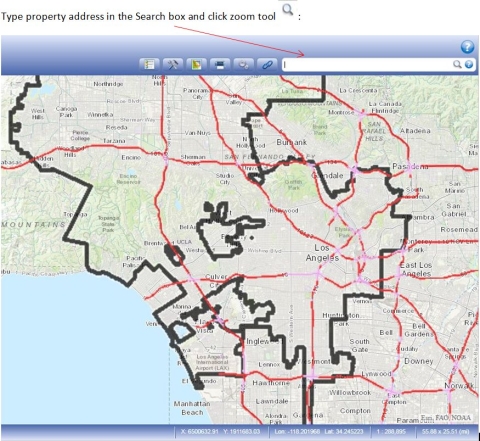
    Step2 . Click accept to continue


  • Enter Address into search bar.

    Image
    Step 3a.  Enter Address into search bar.


  • Navigate LA will zoom to the property location.

    Image
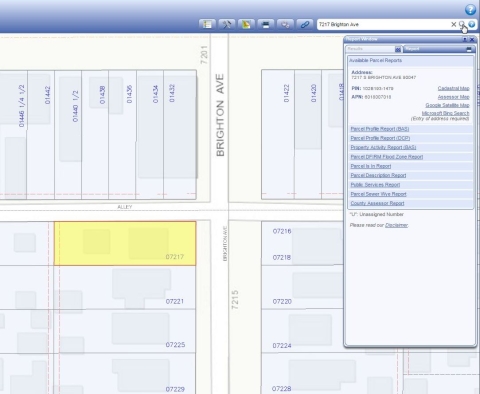
    Step 3b. Navigate LA will zoom to the property location.


  • Click Table or Turn on Table of Contents.

    Image

    Step 4. Click Table or Turn on Table of Contents.


  •            Type "Permits" in the Table of Content filler.

    Image
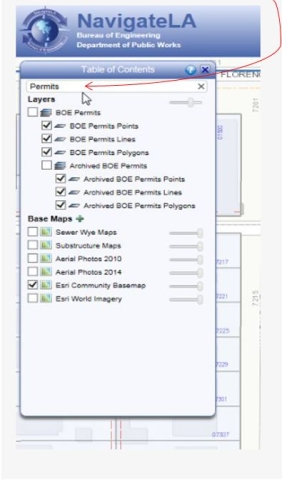
    Step 5. Type "Permits" in the Table of Content filler.


  •                   Turn on archived BOE Permits by checking the checkbox next to it.

    Image
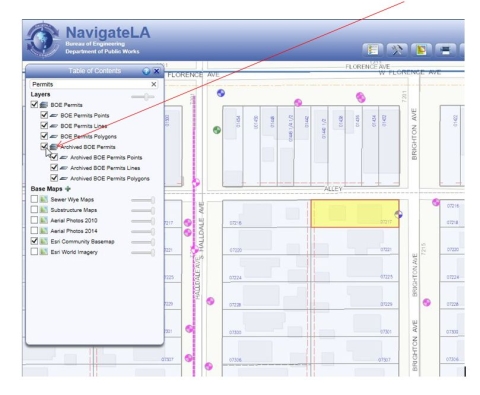
    Step 6. Turn on archived BOE Permits by checking the checkbox next to it.


  • A symbol for the claim will be displayed within the property or at the property boundaries.

    Image
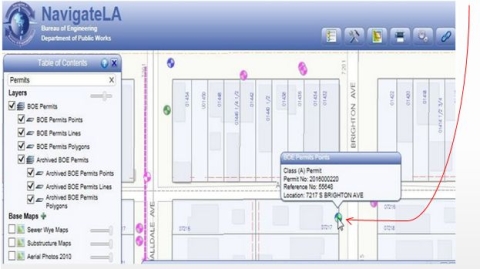
    Step 7a.) A symbol for the claim will be displayed within the property or at the property boundaries.
  • By clicking the permit symbol, a link will be provided for printing a copy of the issued claim

    Image
    Step 7b.)  By clicking the permit symbol, a link will be provided for printing a copy of the issued claim